
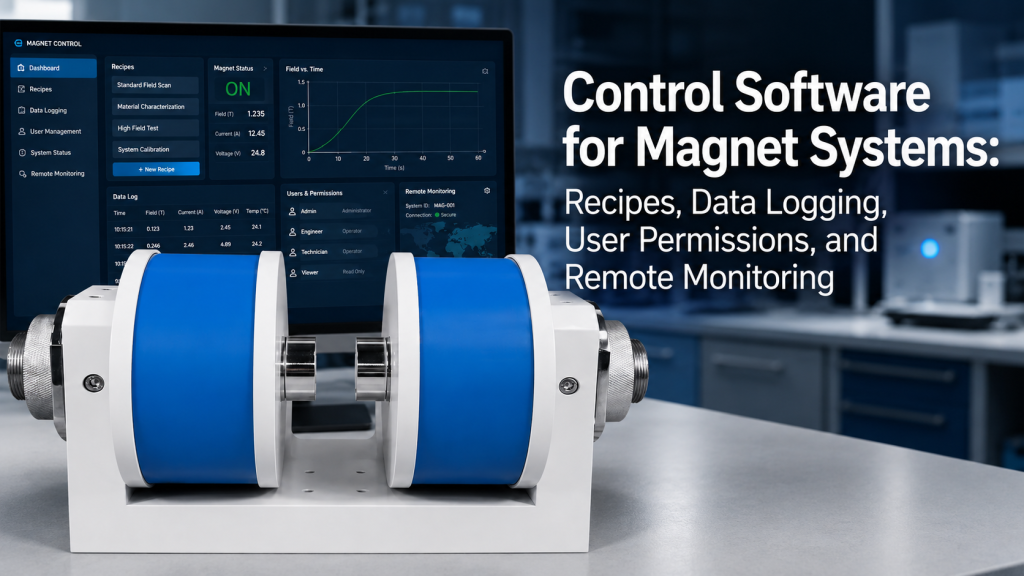
A magnet system is not only a magnet, a coil, and a power supply.
For many modern laboratories, the control software is what turns hardware into a repeatable measurement workflow.
A well-designed control interface can help users set magnetic field recipes, control excitation power supplies, log measurement data, manage user permissions, monitor system status, and support remote troubleshooting.
For Magnet & Field Systems, Helmholtz coils, electromagnets, multi-axis field systems, and precision excitation power supplies, software is no longer a minor accessory. It is part of the complete system.
This article explains what control software for magnet systems should do, why it matters, and what laboratories should check before purchasing a system.
1. Why Control Software Matters in Magnet Systems
A basic magnet system may only need manual current control.
But as the application becomes more advanced, manual operation can become inefficient, inconsistent, and risky.
Control software becomes important when users need:
- Repeatable field sequences
- Automated field sweeps
- Multi-axis field control
- Data logging
- Current and field monitoring
- Temperature and cooling status records
- Alarm history
- User access control
- Remote support
- Recipe-based testing
- Test report generation
This is especially relevant for:
- Sensor calibration
- Magnetometer and IMU testing
- Hall measurement
- Magnetoresistance experiments
- MOKE-related testing
- VSM-related magnetic field control
- Industrial magnetic testing
- Production QA
- Automated test equipment
For these applications, software does not simply make operation convenient.
It helps make the test process repeatable.
2. Recipes: Turning Experience into Repeatable Procedures
A recipe is a saved test sequence or operating procedure.
Instead of manually setting field values step by step, users can load a predefined recipe.
A magnet system recipe may include:
- Field setpoints
- Current setpoints
- Ramp rates
- Hold times
- Settling time
- Axis sequence
- Sweep direction
- Repeat count
- Data logging interval
- Alarm limits
- Cooling requirements
- Operator notes
- Export format
For example, a 3-axis Helmholtz coil recipe might apply:
- +X field
- -X field
- +Y field
- -Y field
- +Z field
- -Z field
- Zero-field check
- Repeat cycle
- Save data file
This is much more reliable than asking different operators to perform the same process manually.
Recipes help reduce operator variation, especially in calibration labs, production testing, and repeatable research workflows.
3. Why Recipes Are Useful for Multi-Axis Field Systems
Multi-axis systems are powerful, but they also increase operational complexity.
A 3-axis magnetic field system may require coordinated control of:
- X-axis coil current
- Y-axis coil current
- Z-axis coil current
- Field vector magnitude
- Field vector direction
- Axis compensation
- Current limits
- Thermal limits
- Field mapping correction
- Timing between field steps
Without software, multi-axis operation can become slow and error-prone.
Recipe-based control helps users run structured vector field sequences with fewer manual mistakes.
For magnetometer calibration, IMU testing, and geomagnetic simulation, this can be especially valuable because the test often requires many repeatable field orientations and amplitudes.
4. Data Logging: More Than Saving Numbers
Data logging is one of the most important software functions in magnet systems.
A useful data log may include:
- Time stamp
- Current setpoint
- Actual current
- Voltage output
- Magnetic field reading
- Axis status
- Temperature
- Cooling flow status
- Chiller temperature
- Alarm state
- User name
- Recipe name
- Sample or DUT ID
- Notes
- Exported file path
Modern laboratory and test environments often depend on structured data acquisition and logging. NI describes LabVIEW as a graphical programming environment used for automated production, validation, and research test systems, with instrument connectivity and user interface development features.
For magnet systems, this matters because the field value alone is not enough. The user often needs to know how the field was generated, when it was generated, under what current, and under what system condition.
5. Why Time Stamps Matter
Every logged value should have a time stamp.
This sounds basic, but it is often missed in simple systems.
Time stamps help users understand:
- When the field changed
- When data was recorded
- Whether the field had enough settling time
- Whether drift occurred over time
- Whether alarms happened before or after a test point
- Whether temperature changes affected the measurement
- Whether the DUT response lagged behind the field change
For automated magnetic testing, time stamps help connect the field sequence, measurement result, and system status into one traceable workflow.
Without time stamps, troubleshooting becomes guesswork.
6. Data Logging Should Match the Test Purpose
Not every project needs the same logging level.
A simple teaching lab may only need current and field values.
A production calibration station may need full recipe logs, operator IDs, DUT IDs, alarms, and exported test reports.
A good software design should match the application.
Basic logging may include:
- Current
- Voltage
- Field value
- Time
Advanced logging may include:
- Recipe name
- Operator ID
- DUT serial number
- Multi-axis field vector
- Temperature and cooling records
- Alarm status
- Stability check result
- Pass/fail result
- Exported CSV or report file
For serious calibration or QA work, incomplete logs can become a problem later when customers need to explain or reproduce results.
7. User Permissions: Preventing Accidental Misoperation
In a shared laboratory, not every user should have the same control rights.
A graduate student, lab technician, engineer, and administrator may need different access levels.
User permission levels may include:
- View only
- Basic operator
- Advanced operator
- Maintenance user
- Administrator
- Service engineer
Different roles may be allowed to:
- Start or stop a recipe
- Change field setpoints
- Edit ramp rates
- Change safety limits
- Export data
- Clear alarms
- Modify calibration factors
- Change communication settings
- Access maintenance mode
This is not bureaucracy.
It is protection.
A magnet system may involve high current, high voltage, cooling water, strong magnetic fields, and expensive samples. A wrong setting can damage equipment or ruin data.
NIST access rights management guidance describes the principle of giving the right person the right access to the right resources at the right time.
That principle applies directly to shared laboratory control software.
8. Audit Trails and Change Records
For formal testing environments, the software should record important changes.
An audit trail may include:
- Who logged in
- Who started a test
- Who changed a recipe
- Who modified a safety limit
- Who exported data
- When an alarm occurred
- When a test was interrupted
- When calibration settings were changed
This is useful for:
- Internal quality control
- Production testing
- Calibration labs
- Troubleshooting
- Training review
- Formal procurement acceptance
- Multi-user laboratories
If a test result looks wrong, audit records can help identify whether the issue came from the hardware, software, operator, recipe, or test condition.
For higher-level data integrity planning, NIST discusses identifying and protecting assets such as devices, data, and applications against data integrity risks.
In magnet systems, data integrity starts with knowing who changed what, and when.
9. Remote Monitoring: Useful, But It Needs Boundaries
Remote monitoring can be very useful for overseas labs and multi-site organizations.
It may allow users or suppliers to check:
- System status
- Current output
- Field value
- Temperature
- Cooling status
- Alarm condition
- Running recipe
- Test progress
- Data logs
- Error messages
For overseas customers, remote monitoring can reduce troubleshooting time. A supplier can review screenshots, logs, and system status before recommending the next step.
But remote monitoring should not mean uncontrolled remote operation.
There is a difference between:
- Viewing system status remotely
- Downloading logs remotely
- Guiding the customer through troubleshooting
- Remotely changing safety limits
- Remotely energizing a magnet
Remote operation of high-current equipment should be controlled carefully and follow local safety rules.
NIST SP 800-171 guidance for remote access emphasizes that organizations should establish usage restrictions, configuration requirements, and connection requirements for remote system access, and authorize remote access before establishing connections.
For magnet systems, this means remote monitoring should be designed with safety and permission boundaries from the beginning.
10. Alarm Monitoring and Event Logging
A good control system should not only show alarms.
It should record them.
Important alarm records may include:
- Overcurrent
- Overvoltage
- Overtemperature
- Cooling flow fault
- Chiller alarm
- Communication loss
- Emergency stop
- Power supply fault
- Door or interlock status
- Sensor fault
- Recipe interruption
- User stop command
Alarm logs help users answer:
- What happened?
- When did it happen?
- What was the system doing at the time?
- Was the magnet energized?
- Was the chiller running?
- Did the user stop the test?
- Did the software stop automatically?
This makes troubleshooting much faster.
A magnet system without event history may leave the supplier and customer arguing from memory instead of data.
11. Safety Interlocks Should Be Visible in Software
Hardware safety is essential.
But software should also display safety status clearly.
Useful interlock indicators may include:
- Emergency stop status
- Cooling flow status
- Chiller ready status
- Door or enclosure status
- Power supply ready status
- Overtemperature status
- Current limit status
- Communication status
- Remote/local control mode
Software should not hide safety conditions behind vague messages.
For example, “system not ready” is less helpful than:
“Cooling flow below threshold — magnet output disabled.”
Clear messages reduce operator mistakes and support faster remote troubleshooting.
12. Integration with Power Supplies and Instruments
Control software becomes more valuable when it can coordinate multiple components.
A complete magnet control system may communicate with:
- Excitation power supply
- Bipolar power supply
- Four-quadrant power supply
- Gaussmeter or teslameter
- Temperature controller
- Chiller
- Motion stage
- DAQ module
- Lock-in amplifier
- PLC or interlock module
- Customer host computer
Common communication interfaces may include:
- USB
- RS-232
- RS-485
- Ethernet
- Modbus
- TCP/IP
- Analog input/output
- Digital I/O
The important question is not only whether software exists.
The important question is:
“What devices does the software actually control or monitor?”
A simple power supply interface is different from a complete magnet system control platform.
13. Data Export and Report Generation
Users should be able to export test data in practical formats.
Common formats include:
- CSV
- Excel-compatible files
- TXT
- PDF report
- JSON
- SQL database export
- Screenshot
- Raw log file
For many laboratories, CSV export is enough.
For production or formal test environments, structured reports may be required.
A useful report may include:
- Project name
- DUT ID
- Operator
- Recipe
- Test date
- Field sequence
- Current and voltage records
- Field measurements
- Stability data
- Alarm history
- Pass/fail result
- Notes
This helps the magnet system fit into the customer’s internal documentation workflow.
For procurement buyers, software reporting can be a real differentiator because it shows the supplier understands delivery and operation, not just hardware.
14. Local Control vs. Networked Control
Not every lab wants networked equipment.
Some labs prefer fully local control because of:
- IT restrictions
- Security requirements
- Offline operation
- Data confidentiality
- Regulatory limits
- Simpler maintenance
- No need for remote access
Other labs prefer networked control because of:
- Remote monitoring
- Centralized data collection
- Multi-user access
- Automated test integration
- Remote support
- Production data tracking
Both approaches can be valid.
The correct design depends on the lab’s IT policy, safety requirements, and workflow.
A serious supplier should not assume that every customer wants cloud access or remote control.
For many scientific instruments, local-first software with optional remote support is often the safest structure.
15. Common Mistakes in Magnet Control Software
Common mistakes include:
- Treating software as an afterthought
- No recipe management
- No time-stamped data logging
- No user permissions
- No alarm history
- No export function
- No clear interlock display
- No distinction between operator and administrator
- No support for multi-axis field sequences
- No settling-time logic
- No error message clarity
- No documentation for communication commands
- Remote access without permission control
- Manual data recording from screen values
These mistakes may not appear during a short demonstration.
They appear later during real laboratory operation, repeated testing, training, and troubleshooting.
16. What to Ask Before Buying Magnet Control Software
Before purchasing a magnet system with control software, ask:
- Can the software save and load recipes?
- Can users define field sequences?
- Does it support ramp rate and hold time?
- Can it log current, voltage, field, and temperature?
- Are data time-stamped?
- Can logs be exported?
- Does it support user roles and permissions?
- Are alarms recorded?
- Are interlock states visible?
- Can it communicate with the power supply and field meter?
- Does it support multi-axis field control?
- Is remote monitoring available?
- Is remote control allowed or restricted?
- Can the system operate offline?
- What operating system is required?
- Is documentation provided?
- Can the software be customized?
These questions help buyers separate a basic interface from a real system control solution.
17. How Cryomagtech Supports Magnet System Control Workflows
Cryomagtech supplies Magnet & Field Systems, including electromagnets, Helmholtz coil systems, multi-axis magnetic field systems, excitation power supplies, and related control configurations.
For suitable projects, we can help customers evaluate:
- Manual vs software-based control
- Recipe-based test sequences
- Current and field logging
- Multi-axis field control
- Power supply communication
- Data export requirements
- Alarm and interlock display
- User permission structure
- Remote monitoring and troubleshooting support
- Custom software requirements
Our goal is not only to supply hardware that generates a magnetic field.
Our goal is to help customers build a repeatable, traceable, and practical magnetic field workflow.
For modern laboratories, the control software is often where hardware performance becomes usable data.
References
- NI – What Is LabVIEW?
NI describes LabVIEW as a graphical programming environment used for automated production, validation, and research test systems, with instrument connectivity and user interface development features.
https://www.ni.com/en/shop/labview - NIST – Access Rights Management
NIST describes access rights management as giving the right person the right access to the right resources at the right time, which is relevant for laboratory software user permissions.
https://www.nccoe.nist.gov/publication/1800-9/VolB/index.html - NIST – Remote Access Guidance
NIST SP 800-171 guidance emphasizes establishing restrictions, requirements, and authorization before remote system access is used.
https://csf.tools/reference/nist-sp-800-171/r3-0/03-01/
Key Takeaways
- Control software can turn a magnet system from manual hardware into a repeatable measurement platform.
- Recipes help standardize field sequences, ramp rates, hold times, and data logging rules.
- Data logging should include time stamps, setpoints, actual values, system status, and alarm records.
- User permissions reduce accidental misoperation in shared laboratory environments.
- Remote monitoring is useful, but remote operation must be controlled carefully.
- Alarm logs and interlock visibility make troubleshooting faster and safer.
- Software should be selected based on workflow needs, not just whether a basic interface exists.
A magnet system does not become a complete solution just because it can generate a field.
It becomes a complete solution when users can control, repeat, record, protect, and review the field generation process.